

SEO for Vibe Coders: The Complete Guide
I inspected every page of a product I'm vibe coding through Google Search Console on 3 October 2026. There were 190 pages in its sitemap. Google had indexed one.
That one was the home page. Of the rest, 145 sat at "Discovered, currently not indexed", 40 were "unknown to Google" altogether, and four had been crawled and turned down. I have spent ten years in SEO. I find these problems on client sites for a living, and the speed of building with AI still had me shipping beginner mistakes that I would have flagged in the first ten minutes of anyone else's audit.
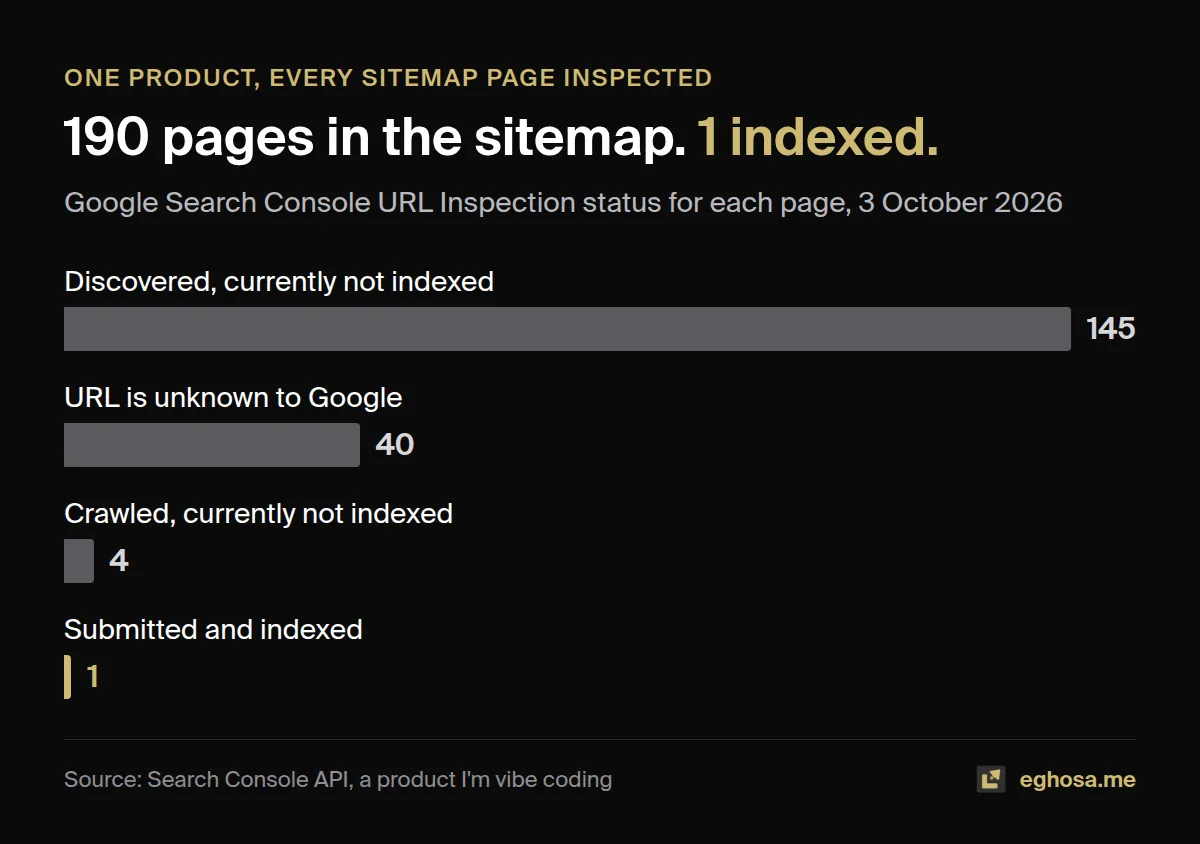
That is the reason this guide exists, and the reason it comes with a checklist. If someone who audits sites every week can miss the basics while an AI writes the code, a founder who has never opened Search Console will miss them too, because building fast and checking carefully pull in opposite directions. Slowing down is the wrong answer, because speed is the whole point of building this way. A list that does not get tired, distracted or excited about the next feature is the right one.
This guide is for anyone who has built a website or web app with an AI tool, whether that is Lovable, Bolt.new, v0, Replit, Base44, Cursor, Claude Code or something that launched last week. It explains how Google and the AI assistants actually read what you built, what each platform does and does not handle for you, the mistakes I made and how I found them, and what to do in the first thirty days after launch. Every platform fact links to that platform's own documentation and every study links to its source, since a guide about getting found should be one you can check.
What is in this guide
- The five-minute test: is your site invisible?
- How Google and AI crawlers actually read your site
- Choose a findable setup before you write the first prompt
- Platform by platform: Lovable, Bolt, v0, Replit, Base44 and the rest
- The beginner mistakes I made with ten years of SEO
- The technical foundations, step by step
- Getting indexed, and what Search Console is telling you
- Content that deserves to be indexed
- Getting cited by ChatGPT, Google's AI features, Perplexity and Claude
- Links and authority for builders
- Measuring what happens after launch
- Copy-paste prompts for your AI builder
- Questions people ask
1. The five-minute test: is your site invisible?
In short: five checks, none of which need technical knowledge, tell you whether search engines can see your site at all. Run them before you read anything else, because the answer decides which parts of this guide matter most to you.
Most vibe-coded sites look perfect in a browser, which is exactly why their problems go unnoticed. Your browser runs the JavaScript, builds the page and shows you the finished result. A crawler may receive something very different, and the only way to know is to look at what it receives.
Check 1: view the source
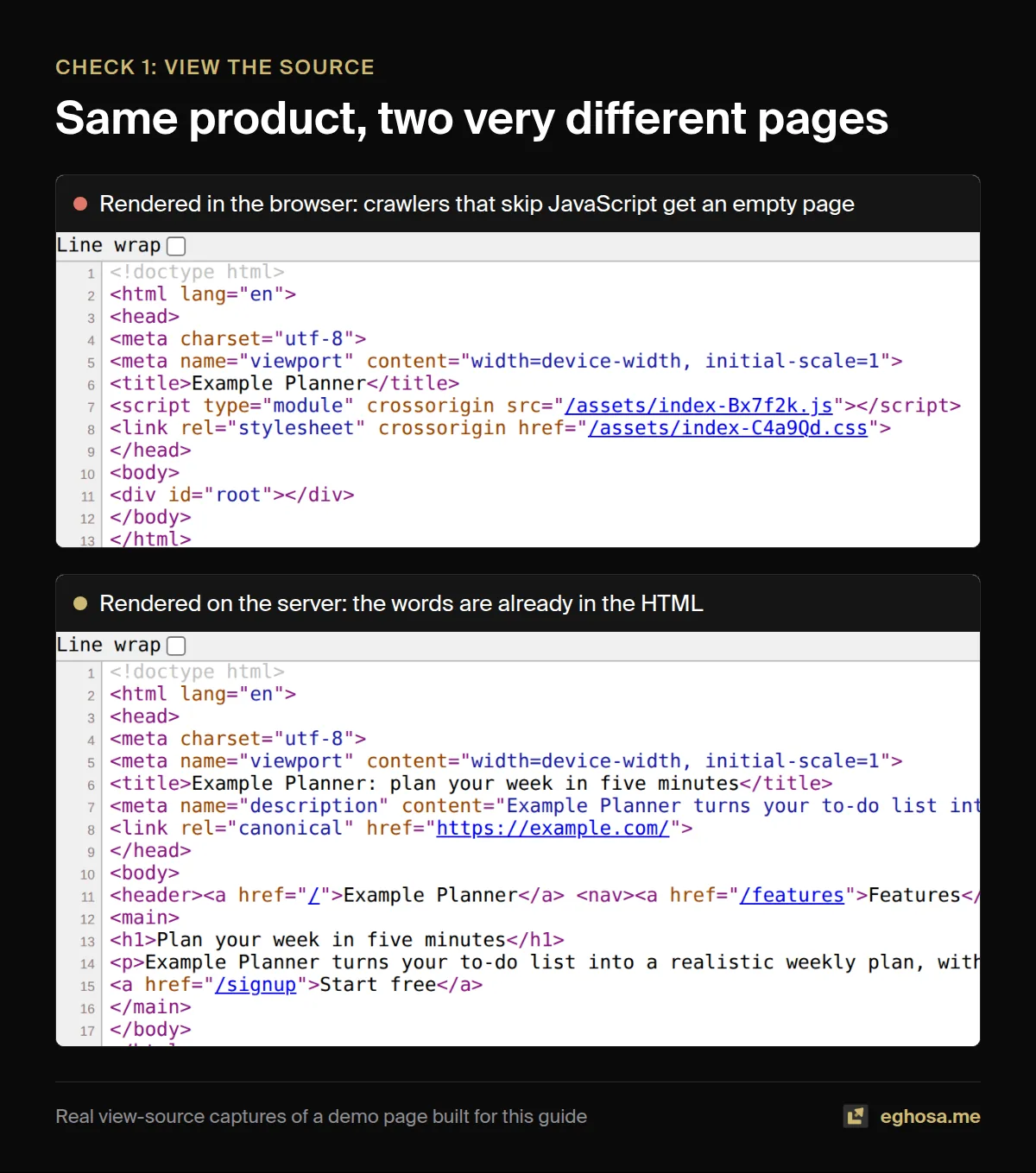
Open your site, right-click anywhere on the page and choose "View page source" (on a Mac, Option, Command and U together). This shows the HTML your server actually sends, before any JavaScript runs. Press Ctrl+F or Command+F and search for a sentence you can see on the page.
If you find your words, the content is in the HTML and every crawler can read it. If all you find is a near-empty page with something like <div id="root"></div> and a few script tags, your site is "client-side rendered": the content only exists after a browser runs your JavaScript. Google can usually cope with that, slowly. Most AI crawlers cannot, as section 2 explains.
Check 2: ask Google what it sees
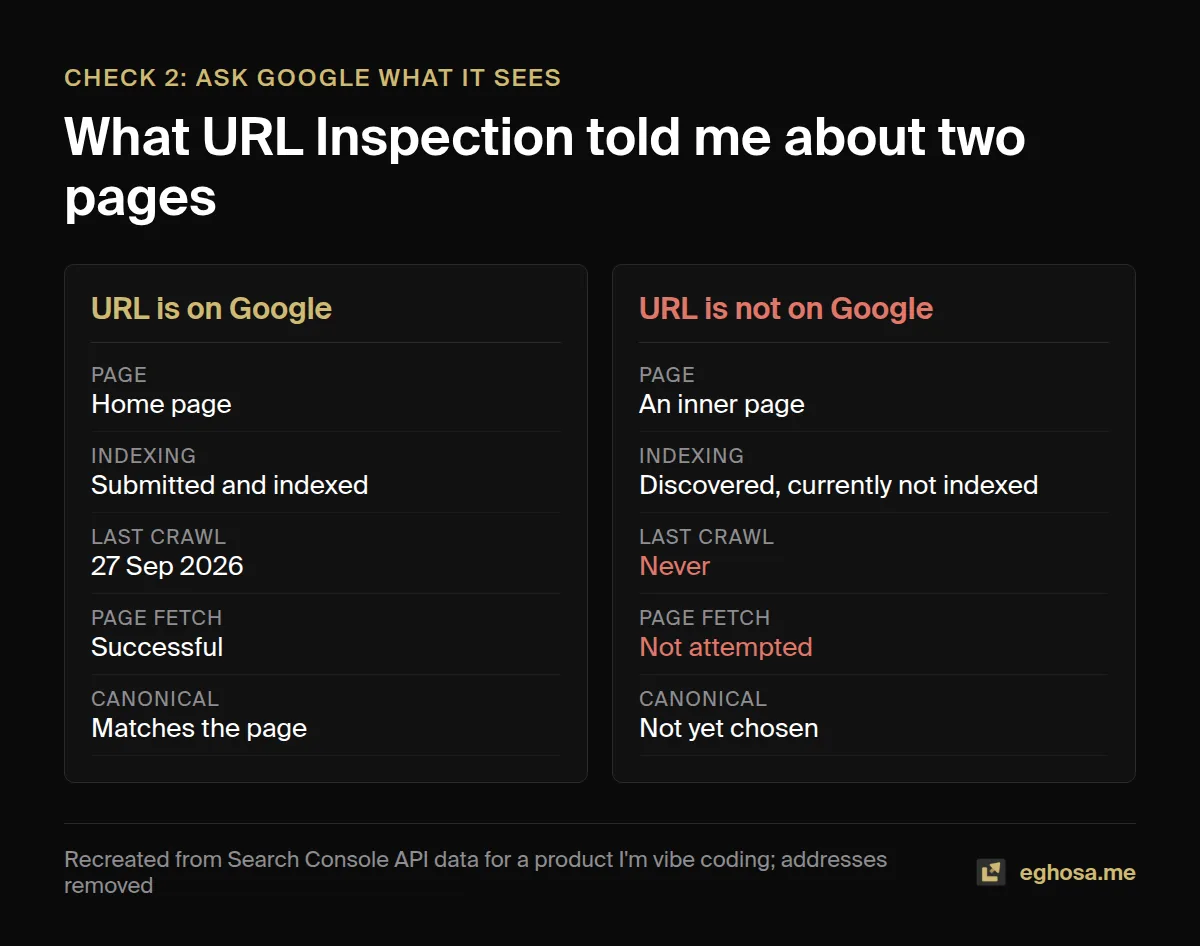
In Google Search Console, paste your page's address into the search bar at the top. This is the URL Inspection tool. It tells you whether the page is indexed, when Google last crawled it, and which version of the address Google treats as the real one. Press "Test live URL", then "View tested page", and you can read the HTML Google rendered and see a screenshot of the page as Google saw it.
Check 3: search for yourself
Type site:yourdomain.com into Google. It is a rough count rather than an exact one, but if it returns nothing, or only your home page, you have an indexing problem worth fixing before anything else in this guide.
Check 4: fetch the page the way a crawler does
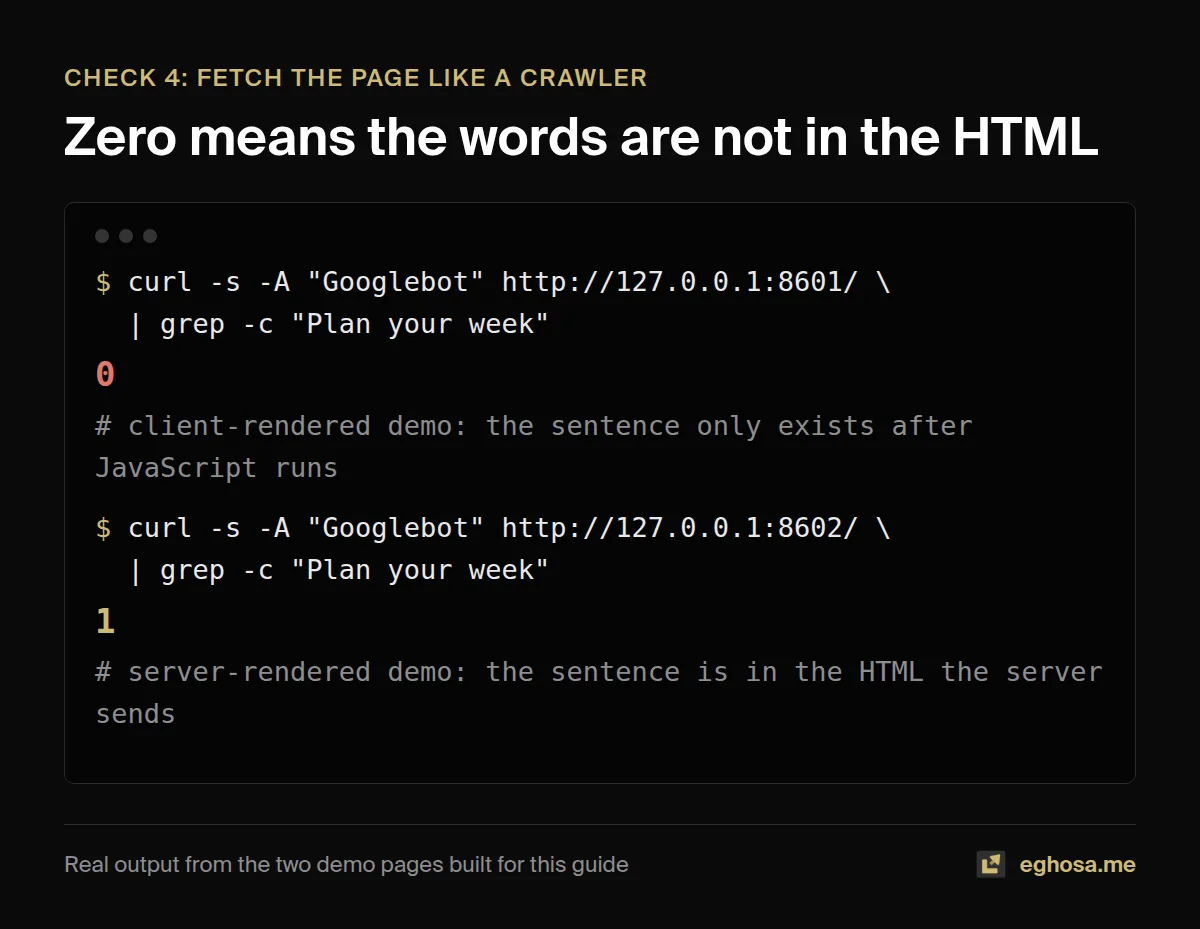
If you are comfortable opening a terminal, this one command fetches your page the way a crawler does, without running any JavaScript, and counts how many times a phrase from your page appears in the raw HTML:
curl -sL -A "Googlebot" https://yourdomain.com/ | grep -c "a sentence from your page"A zero means the words are not in the HTML. On a client-side rendered site it is almost always zero. One exception: older Lovable projects serve a pre-rendered copy only to verified crawlers, so this check shows an empty page even when Google sees the content, and URL Inspection (check 2) is the one to trust there.
Check 5: make sure you are not hiding
Visit yourdomain.com/robots.txt. If you see Disallow: / under User-agent: *, you are asking every search engine to stay out. Then view your page source again and search for noindex. A <meta name="robots" content="noindex"> tag left over from a staging build is one of the most common reasons a finished site never appears, and AI builders add them more often than you would think.
If all five checks pass, your foundations are probably sound and you can skim to section 7. If any of them failed, read on in order.
2. How Google and AI crawlers actually read your site
In short: Google can run JavaScript, but it does so in a queue that can add hours of delay. The major AI crawlers measured so far do not run it at all. Put your content in the HTML and both problems disappear.
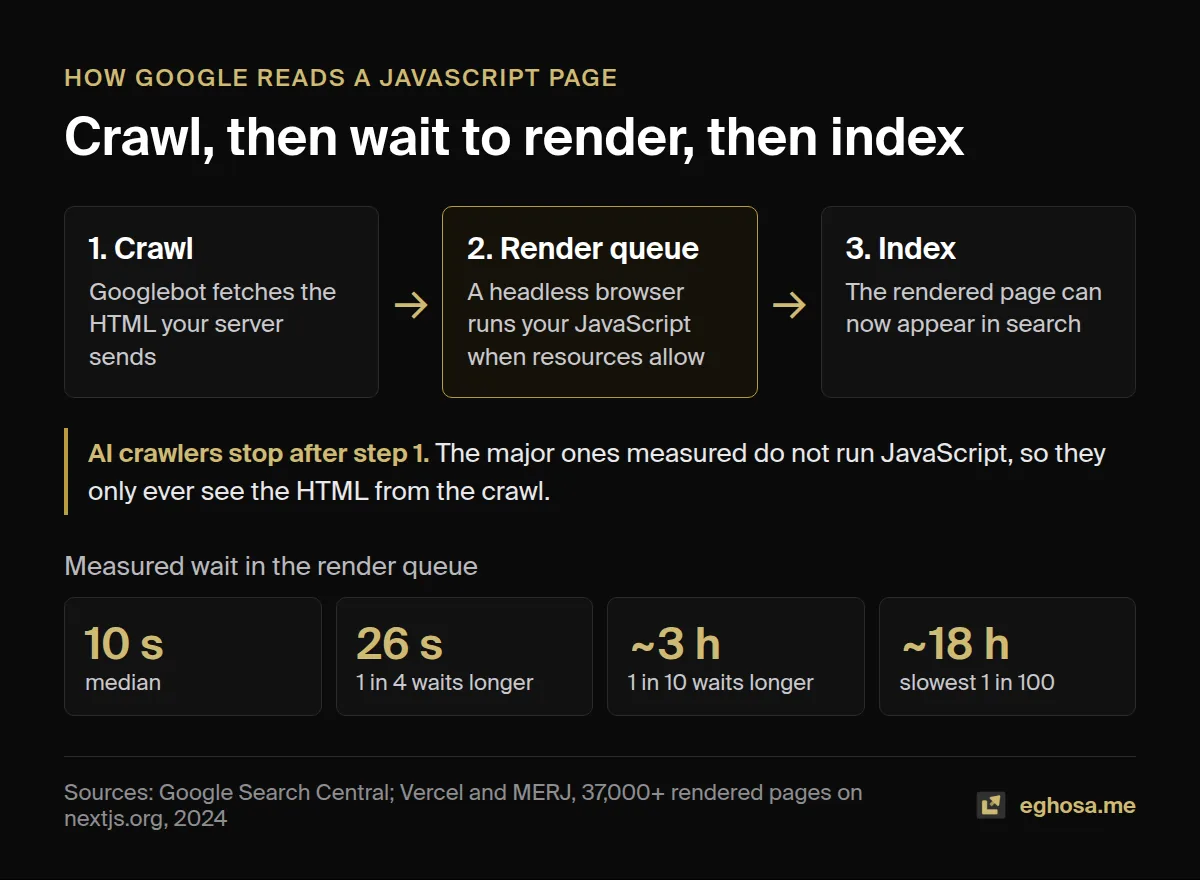
Google describes its process in three phases: crawling, rendering and indexing (Google Search Central, JavaScript SEO basics). Googlebot fetches your HTML first. If the page needs JavaScript to show its content, it waits in a rendering queue until Google has the resources to run it in a headless browser, and only then can the content be indexed.
How long is that wait? The best independent measurement comes from Vercel and the research firm MERJ, who analysed more than 100,000 Googlebot fetches in April 2024 and timed rendering on more than 37,000 matched pages of nextjs.org (Vercel, July 2024). Every HTML page they tracked was eventually rendered. The median delay was 10 seconds, but a quarter of pages waited longer than 26 seconds, one in ten waited around three hours, and the slowest one percent waited around 18 hours. That is a well-known site with plenty of authority, so my working assumption is that a brand-new domain waits at least as long, and that is an inference rather than something the study measured.
Google's own documentation is careful but clear about where it stands: "server-side or pre-rendering is still a great idea because it makes your website faster for users and crawlers, and not all bots can run JavaScript." That last clause is the part vibe coders need to sit with.
The crawlers that never run your JavaScript
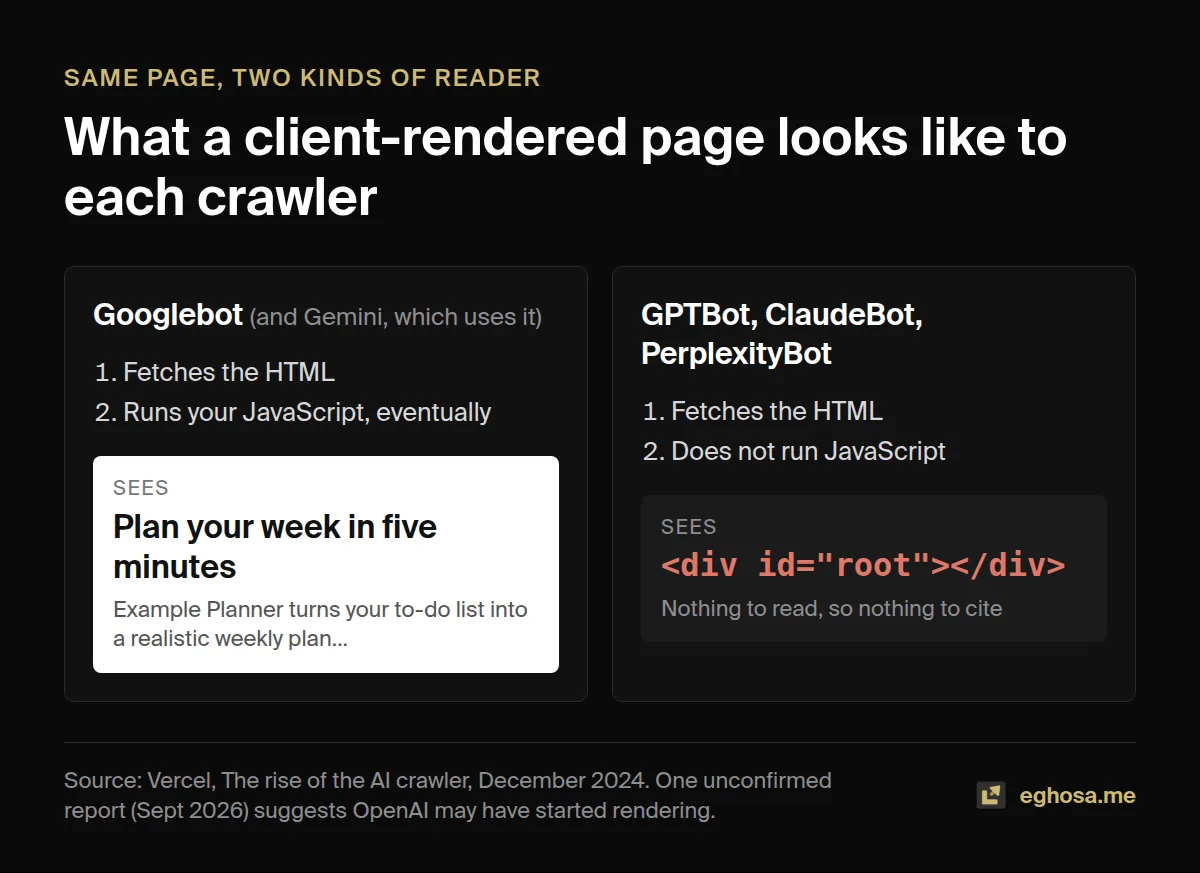
In December 2024, Vercel published the largest look at AI crawlers so far, based on traffic across its network (Vercel, "The rise of the AI crawler"). OpenAI's GPTBot made 569 million requests in a month and Anthropic's Claude 370 million. The finding that matters is this one: "None of the major AI crawlers currently render JavaScript." They download your JavaScript files, but they do not run them, so whatever your page builds in the browser simply is not there for them. Google's Gemini is the exception, because it uses Googlebot's rendering, and Apple's crawler also renders.
So a client-side rendered site can rank on Google, eventually, while being an empty page to ChatGPT, Claude and Perplexity. When someone asks one of those assistants for a tool like yours, the assistant has nothing to read.
The honest caveat: this may be changing
On 30 September 2026, a developer published server logs showing traffic from OpenAI's search crawler on four of their Next.js sites jumping from about 1,250 requests a day to more than 41,000 within three days, with request patterns that suggest the crawler had started running JavaScript (DEV Community). That is one report from one server, and OpenAI has announced nothing. So the advice does not change. Even if the AI crawlers learn to render, they will do it on their schedule and within their budget, and HTML that already contains your content will always be read first and read completely.
Bing is worth a separate mention, because ChatGPT search is widely reported to draw on Bing's index. Bing has never been as confident about JavaScript as Google: its engineers wrote in 2018 that it is "difficult for bingbot to process JavaScript at scale on every page of every website", and its published guidance treats serving pre-rendered pages to crawlers as acceptable, a position Google has since moved away from (Bing Webmaster Blog).
3. Choose a findable setup before you write the first prompt
In short: decide how your pages are rendered before you build them. It is a one-line instruction at the start and a migration project at the end.
Almost every SEO problem in this guide traces back to one early choice, made by the AI on your behalf unless you make it yourself. There are three ways a page can reach a visitor.
| Approach | What the crawler receives | Best for |
|---|---|---|
| Static generation (SSG) | Finished HTML, built once at deploy time | Marketing pages, blogs, docs, landing pages, anything that does not change per visitor |
| Server-side rendering (SSR) | Finished HTML, built on each request | Pages that change often or per visitor but still need to rank, such as listings or search results |
| Client-side rendering (CSR) | A near-empty shell plus JavaScript | Screens behind a login, dashboards and tools nobody needs to find through search |
Google is explicit that serving crawlers a different, pre-rendered version of a page (what it calls "dynamic rendering") "was a workaround and not a long-term solution", and it recommends server-side rendering, static rendering or hydration instead (Google Search Central). So if anything public needs to be found, the default answer is static or server-rendered HTML.
The good news is that most AI builders will do this if you ask. Put something like this at the very start of a new project:
This site must be findable on Google and readable by AI crawlers that do not run JavaScript. Use server-side rendering or static generation for every public page, so the full text of each page is in the HTML the server sends. Keep client-side rendering for screens behind a login only.If the app already exists, the cheaper route is often to keep the app where it is and put the public pages (home, features, pricing, blog, guides) on a static or server-rendered setup, with the logged-in product on a subdomain. Search engines only need to read the pages you want found.
4. Platform by platform
In short: each builder handles rendering differently, several changed their approach in 2026, and much of what currently ranks for "Lovable SEO" or "Bolt SEO" is already out of date. Everything below links to the platform's own documentation, checked in October 2026.
| Platform | What crawlers get by default | The trap to watch |
|---|---|---|
| Lovable | Server-rendered HTML for apps created from 13 May 2026; pre-rendered copies for older apps, served to verified crawlers only | SEO tools see the empty shell on older apps; extra domains redirect with temporary 302s |
| Bolt.new | Depends on the framework chosen; pre-rendering ("SEO Boost") is a Pro plan feature | Private sites are hidden from search by design |
| v0 by Vercel | Next.js with server rendering by default | Preview and vercel.app copies can compete with your real domain |
| Replit | Agent builds are often single-page React apps; Static Deployments give pre-rendered HTML | Development URLs and replit.app copies |
| Base44 | Says it serves crawlers a rendered version; SEO supported on custom domains only | One independent test found rendering inconsistent; base44.app copies |
| Cursor and Claude Code | Whatever you, or the AI, choose | No guard rails: the framework decision is entirely yours |
| Firebase Studio | Next.js on App Hosting | Closed to new users; all data deleted on 22 March 2027 |
Lovable
Lovable changed the picture in 2026, and most of the articles ranking for "Lovable SEO" have not caught up. According to Lovable's own documentation, new apps created from 13 May 2026 use TanStack Start with server-side rendering, so their pages arrive as real HTML. Older React and Vite apps get "pre-rendering" instead: Lovable keeps a rendered copy of each published page and serves it to verified search engines, social preview bots and AI crawlers.
That second detail has a consequence nobody seems to mention. Because the pre-rendered copy goes only to verified crawlers, third-party SEO tools such as Screaming Frog, and the terminal check in section 1, still receive the empty shell. On an older Lovable app, an audit tool can report problems that Google never sees, so use Search Console's URL Inspection as the source of truth there, or upgrade the project to the new stack (Lovable publishes an upgrade path).
Two more things to know. When you connect several domains, Lovable redirects the extras to your primary domain with a temporary 302 redirect rather than a permanent 301, because primary domains can be changed (Lovable custom domains), and the default lovable.app address cannot be removed. Make sure your canonical tags and sitemap point at the domain you want to rank. Lovable also ships an "SEO and AI search" review tab, which is worth running, but a green score from any platform tool is a starting point rather than proof, as one founder found when Lovable kept reporting her SEO score as "over 90%" while Googlebot received an empty <div id="root"> (Andrea Saez, February 2026, written before the switch to server rendering).
Bolt.new
Bolt builds with a range of JavaScript frameworks, so what crawlers receive depends on what was generated. Its answer to the rendering problem is "SEO Boost", introduced with Bolt v2 in October 2025, which creates a ready-made HTML version of each page ahead of time (Bolt v2 announcement). The pricing page lists SEO boosting and custom domains under the Pro plan (Bolt pricing), so on the free plan you should assume crawlers get whatever the framework sends. Sites published as private are hidden from search engines by design, which is easy to forget when you flip a project public at launch.
v0 by Vercel
v0 builds with Next.js and server components, and its pages are server-rendered by default, with metadata, Open Graph images and structured data supported out of the box (Vercel). That makes it the strongest starting point of the group. The trap is duplicates. Vercel adds a noindex header to preview deployments automatically, but it stops doing so when a custom domain is assigned to a non-production branch (Vercel knowledge base), and your your-project.vercel.app address keeps serving the same pages as your real domain unless you redirect it.
Replit
Replit runs an automatic SEO rating after every publish and offers a paid SEO Agent that fixes titles, descriptions, sitemaps and structured data. For content-heavy sites it points you to Static Deployments, which deliver pre-rendered HTML (Replit documentation). I found no official statement of what stack the Agent produces by default, but community reports describe Agent-built apps as single-page React apps that send an empty root element, so run the section 1 checks before assuming anything (Replit community forum).
Base44
Base44 says it serves crawlers "a rendered version of your app instead, with your meta tags, structured data, and real page content in the HTML", and that its SEO setup is designed for apps published on a custom domain (Base44 documentation). One independent test found only 34% of inner pages arrived pre-rendered on Googlebot's first request (base44seo.com). I do not know who runs that test or when it was done, so treat it as one data point rather than a verdict, and check your own pages with URL Inspection.
Cursor, Claude Code and other coding agents
General coding agents have no default stack. They build whatever the conversation leads them to, and if you never mention search, you will often get a client-rendered React app because that is the most common pattern in their training data. This is where the prompt in section 3 matters most, because nothing else will make the decision for you.
Firebase Studio
Google announced in March 2026 that Firebase Studio is closing. New sign-ups and workspaces were switched off on 22 June 2026, and on 22 March 2027 the service shuts down and all remaining data is deleted, with users pointed to Google AI Studio and Antigravity (Firebase documentation). If your site was built there, the SEO priority is a clean migration: keep every URL the same, or redirect each old address to its new one with a permanent 301.
5. The beginner mistakes I made with ten years of SEO
In short: these are real mistakes from products I'm building with AI right now. None of them is exotic, and every one of them is a problem I regularly find on client sites, which is the point.
I keep a record of every finding across the 57 accounts on my book. Metadata defects show up on 13 of them, the most common technical finding I log. Stale or broken sitemaps show up on 8, URLs and hostnames split across duplicate versions on another 8, and a robots.txt file shutting out something it should not on 6, one of which was blocking an AI answer crawler while competitors were being cited. Those counts are accounts with a recorded finding, not failure rates. I know these problems well enough to find them half asleep, and I still shipped all of them myself.
| Mistake I made while vibe coding | How often I record the same problem on my client book |
|---|---|
| Sitemap dates that never moved | Stale or broken sitemaps on 8 of 57 accounts |
| A www address that returned an error while the main domain worked | Hostname and URL variants on 8 of 57 accounts |
| A robots.txt default that shut out AI assistants | robots.txt blocking what it should not on 6 of 57 accounts |
| Duplicated schema and a meta description bug | Metadata defects on 13 of 57 accounts |
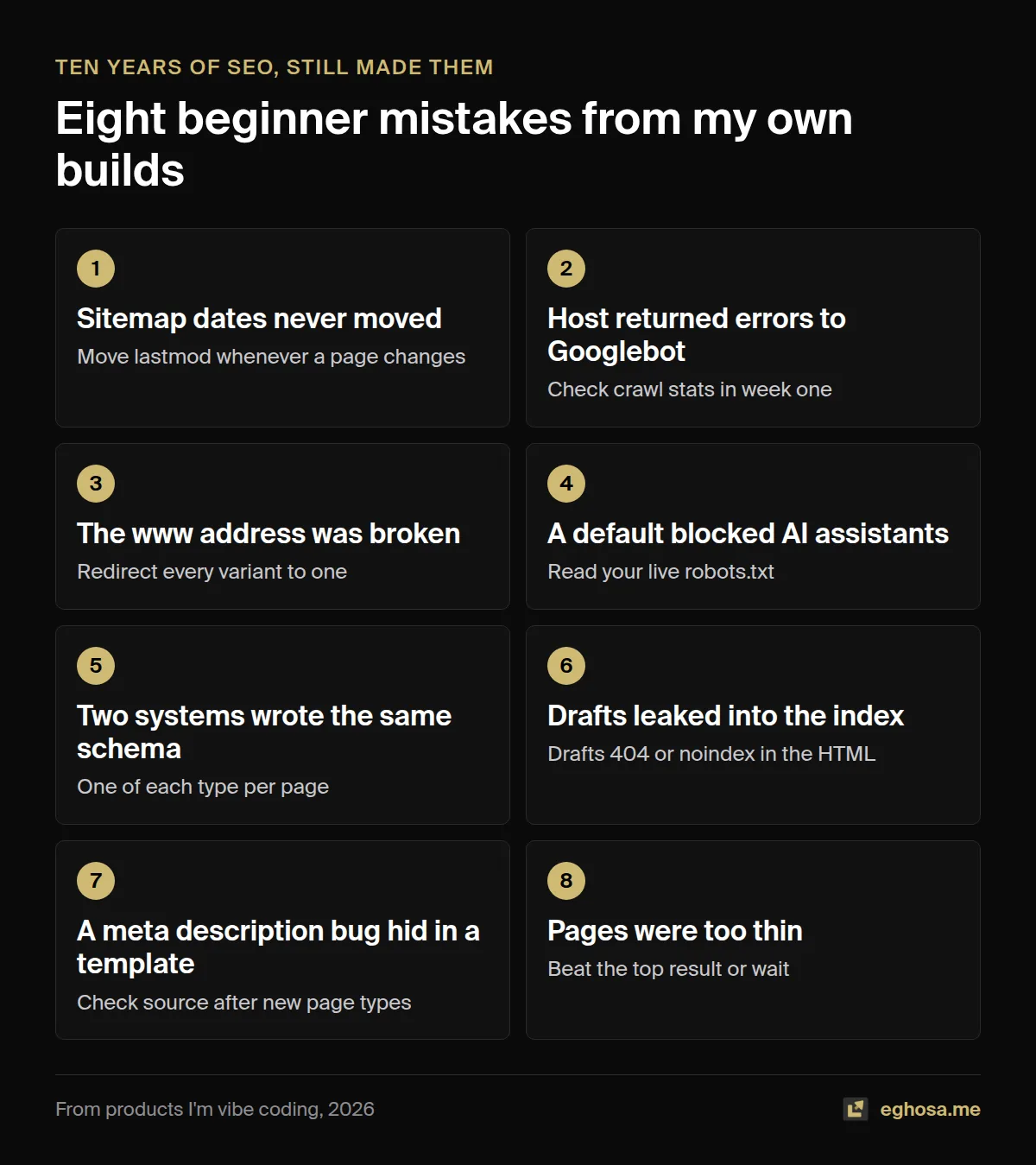
Mistake 1: the sitemap dates never moved
On the product with one page indexed, I had rewritten 114 pages, and every one of them still told search engines it had last changed about two weeks earlier. The sitemap took its lastmod dates from the page records, but the rewritten copy was stored somewhere else, so the dates never updated. A lastmod that never moves tells every crawler there is nothing new to fetch, and Google says it only uses lastmod when the value is consistently and verifiably accurate (Google, build a sitemap). The fix was to move the date whenever a page's copy changes. The checklist line: after any rewrite, confirm the page's date in the sitemap moved.
Mistake 2: the host answered Googlebot with errors
Through late September the same product's host intermittently returned Cloudflare 522 errors (the origin server timing out) to crawlers, before I moved it to static hosting. Google says plainly that when a site responds with server errors, its crawl limit goes down and it crawls less (Google, crawl budget). The site looked fine every time I checked it myself, which is the trap. The checklist line: check Search Console's crawl stats for server errors in the first week, not just your own browser.
Mistake 3: the www address was broken
On another product I'm building, the main domain worked perfectly while www. returned a 522 error. Anyone who typed the www version, or clicked an old link that used it, hit an error page, and so did any crawler following one. The checklist line: load both the www and non-www versions, on http and https, and make sure three of the four redirect permanently to the fourth.
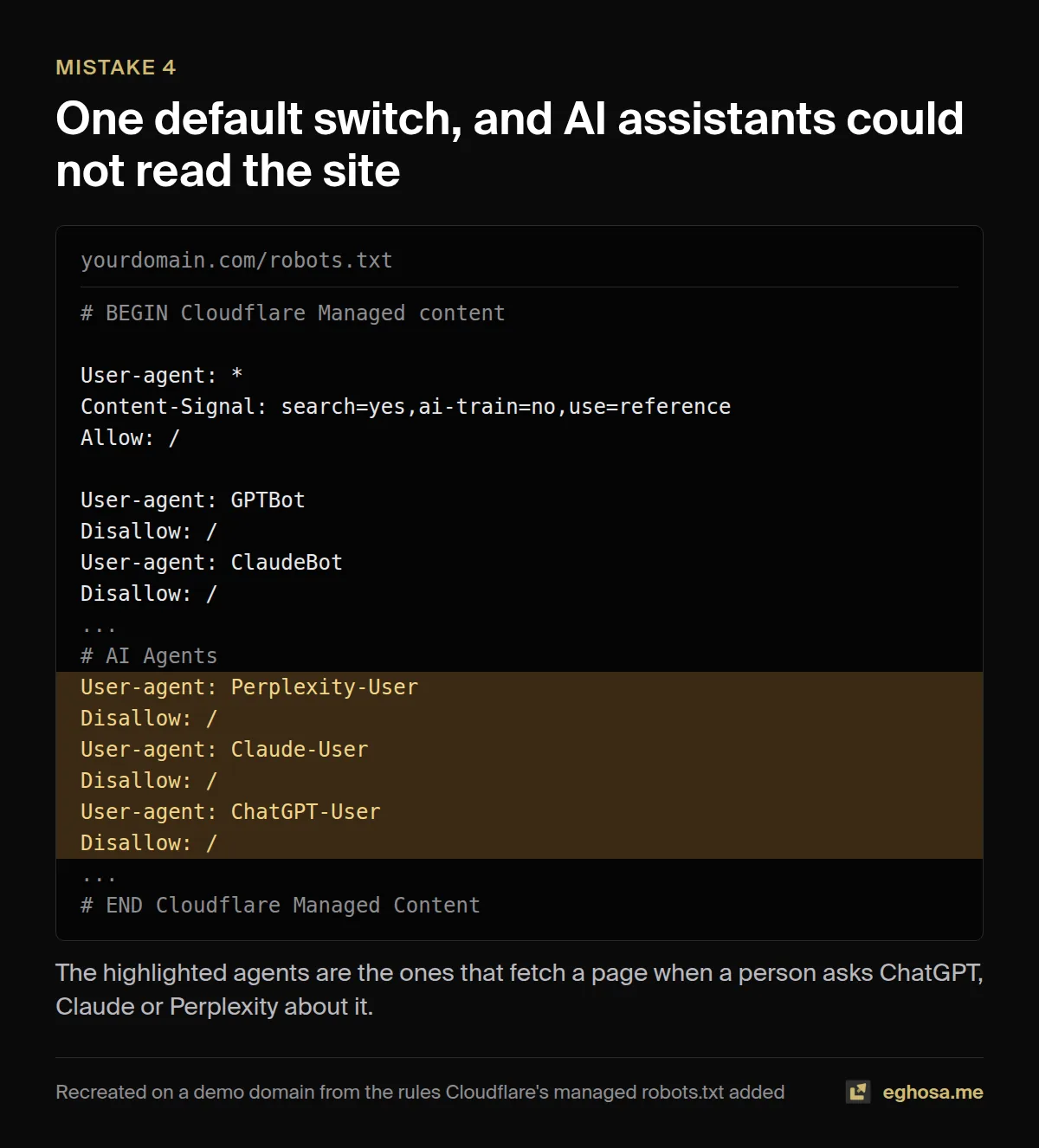
Mistake 4: one default switch blocked every AI assistant
That same product had Cloudflare's managed robots.txt switched on, which adds rules on your behalf. When I read the file, it was blocking not only AI training crawlers but also ChatGPT-User, Claude-User and Perplexity-User, the agents that fetch a page when a person asks an assistant about it. So when someone asked ChatGPT about the topic, it could not read the site, let alone cite it. Nothing was broken in the browser and nothing showed up in Search Console. The checklist line: read your live robots.txt after launch, line by line, and decide deliberately which AI crawlers you allow.
Mistake 5: two systems wrote the same schema
Structured data is the code that tells search engines what a page is about in a machine-readable form. On one build, two different parts of the stack were both writing it, so pages carried duplicate and sometimes conflicting markup. The checklist line: run your key pages through Google's Rich Results Test and make sure each type appears once.
Mistake 6: unpublished pages leaked into the index
Pages that were still drafts were reachable and listed before they were ready. In my experience, a thin, half-finished page that Google indexes early does the rest of the site no favours, and it is far easier to keep it out than to get it reassessed later. The checklist line: make sure drafts return a 404 or carry noindex in the HTML the server sends, and that the sitemap only lists finished pages.
Mistake 7: a meta description bug hid in a template
A bug in how descriptions were generated only surfaced when I added a new kind of page, which is typical of template problems: they stay invisible until a new case exposes them. The checklist line: after adding any new page type, view the source of one example and read its title and description.
Mistake 8: the pages were too thin
AI makes it easy to publish many pages quickly, and I did. At least fifteen of them had to be rewritten before they deserved a place in Google's index, and four pages that Google crawled and declined are the clearest signal that it agreed. The checklist line: before publishing a page, ask what it offers that the current top result does not.
6. The technical foundations, step by step
In short: ten things every public page needs. AI builders get most of them right some of the time, which is exactly why each one has to be checked rather than assumed.
Every page needs its own title and description
A single-page app often has one index.html, which means one title and one description shared by every route unless something changes them per page. Search results then show the same title for your pricing page and your blog posts. View the source of three different pages and compare their <title> and <meta name="description"> tags; they should all differ and say what that page is about.
Links must be real links
Crawlers discover pages by following <a href="..."> links. AI-generated interfaces often use buttons that change the page with JavaScript instead, which a person can click but a crawler cannot follow. One audit of a vibe-coded site found 20 navigation buttons like this across 11 public files (Andrea Saez). The fix is simple, and AI tools make it happily when asked:
<!-- A crawler cannot follow this -->
<button onClick={() => navigate('/pricing')}>Pricing</button>

<!-- A crawler can follow this -->
<a href="/pricing">Pricing</a>
Missing pages must say so
Many single-page apps answer every address with a 200 OK status and then show a "not found" message with JavaScript. To a crawler, a made-up address looks like a real page, and Google flags these as "soft 404s". Google's guidance for single-page apps is to redirect to an address where the server returns a real 404, or to add a noindex tag to error pages (Google). Test it by visiting yourdomain.com/this-page-does-not-exist and checking the status code in your browser's developer tools, under the Network tab.
Redirects belong on the server
A redirect that happens in the browser works for visitors and can still read as a soft 404 to Google. One developer found six of these flagged in Search Console on a React site and fixed them by moving the redirects into the hosting configuration as permanent 308 redirects (DEV Community). Every host has a redirects file or setting; use it.
One address per page
Pick one version of your domain (with or without www, always https) and redirect the others to it permanently. Then give every page a canonical tag pointing at its own preferred address, written into the HTML rather than added by JavaScript, because Google advises against using JavaScript to change the canonical to something different from the original HTML. Platform addresses such as .vercel.app, .lovable.app, .replit.app or .base44.app should redirect to your domain or carry noindex.
Never rely on JavaScript to remove noindex
This one catches people who launch from a staging build. If the HTML arrives with noindex and your JavaScript removes it later, the fix may never be seen, because Google says that when it encounters the noindex tag it may skip rendering and JavaScript altogether. The Vercel and MERJ study confirmed it: client-side removal of noindex is not effective. Remove it from the HTML at source.
A sitemap with honest dates
Your sitemap at /sitemap.xml should list every page you want found, only those pages, with absolute addresses and a lastmod date that changes when the content does. Declare it in robots.txt with a Sitemap: line and submit it in Search Console. Google ignores the priority and changefreq fields, so there is no need to fiddle with them.
Structured data, once and accurately
Add structured data for what each page actually is: Organization on the home page, Article or BlogPosting on posts, Product or SoftwareApplication where relevant, and BreadcrumbList for navigation. JSON-LD is the format Google recommends. Rich results are never guaranteed, so treat structured data as describing your page correctly rather than as a ranking trick.
Images that load fast and explain themselves
Give every meaningful image descriptive alt text, explicit width and height (which stops the page jumping as it loads), and a modern format such as WebP. AI builders often drop in large PNGs that look fine on fast office Wi-Fi and crawl on a phone.
Speed, measured the way Google measures it
Google's Core Web Vitals have three "good" thresholds, measured at the 75th percentile of real visits: Largest Contentful Paint within 2.5 seconds, Interaction to Next Paint within 200 milliseconds, and Cumulative Layout Shift below 0.1 (web.dev). Run your key pages through PageSpeed Insights. A client-rendered app has a built-in disadvantage here, since nothing useful appears until the JavaScript has downloaded and run.
7. Getting indexed, and what Search Console is telling you
In short: verify your site in Search Console and Bing Webmaster Tools on launch day, submit the sitemap, and learn to read the two "not indexed" statuses, because they need opposite fixes.
Set up Google Search Console and Bing Webmaster Tools the day you launch (Bing can import your Search Console setup in a couple of clicks), then submit your sitemap in both. After that, the Pages report in Search Console tells you how many pages are indexed and why the others are not.
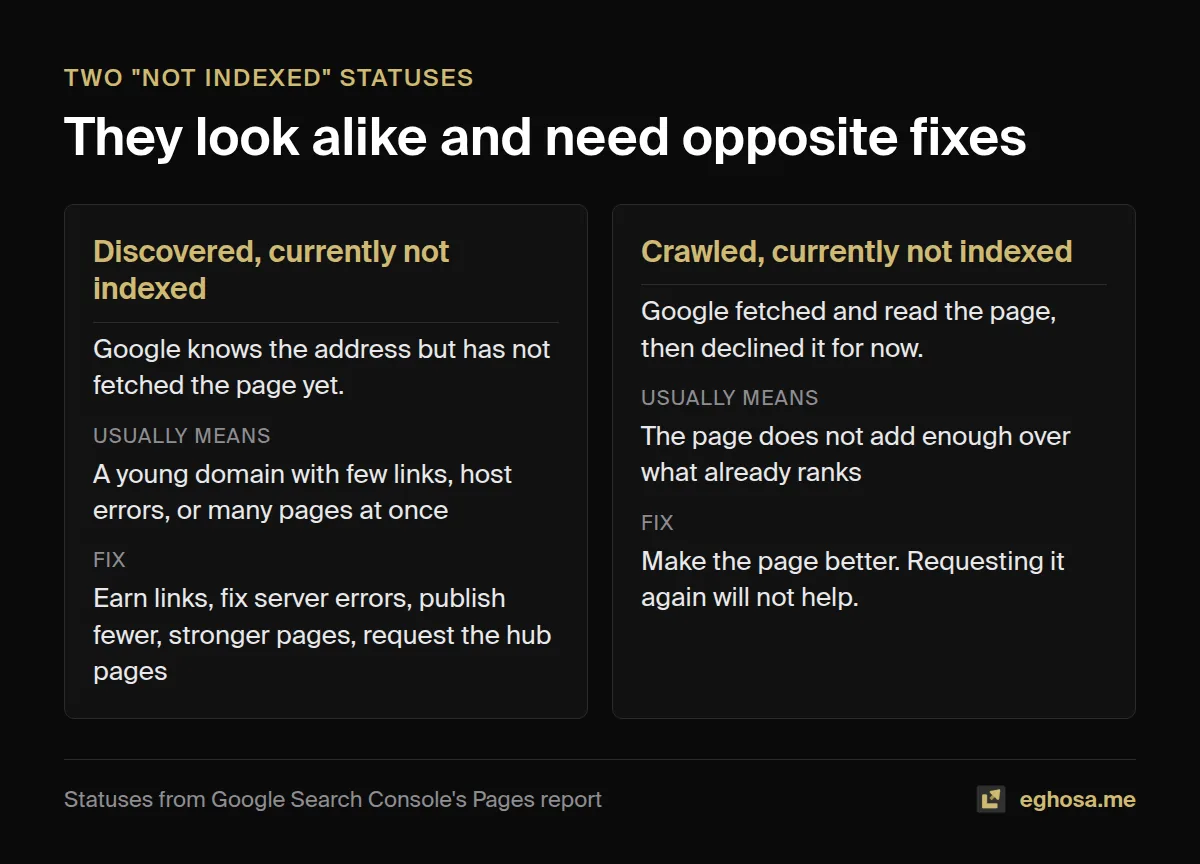
Two statuses deserve particular attention, because they look alike and mean very different things.
"Discovered, currently not indexed" means Google knows the address exists (usually from your sitemap) but has not fetched the page yet. On a young site this is Google declining to spend crawl on you yet, and in my experience the usual causes are a new domain with few links pointing at it, a host that returned errors to Googlebot, and a large number of pages appearing at once. All of these applied to my product with one page indexed, and 145 of its 190 pages sat in this state.
"Crawled, currently not indexed" means Google fetched the page, read it, and decided against indexing it for now. That is a quality judgement rather than a crawl problem, so the fix is a better page, not another request.
The indexing routine I now run
After my baseline came back with a single page indexed, I set up a routine. Each step exists because it fixes one of the causes above.
- Honest dates. Every rewrite moves the page's
lastmod, so the sitemap tells the truth about what changed. - IndexNow on every deploy. IndexNow is a protocol shared by Bing, Yandex, Seznam, Naver and Yep: one request tells all of them which pages changed. I announced all 181 unique pages once and every one was accepted, and each deploy now announces only the pages whose dates moved. Google does not take part in IndexNow.
- Manual requests where they count. Search Console's "Request indexing" button has a small daily quota (in my experience about ten requests a day), so I spend it on hub pages first, because a crawled hub links Google to every page beneath it, then on new pages, then on the most valuable pages still waiting.
- A daily log. I record each page's status from URL Inspection every day, so progress reads as a trend rather than a feeling.
One warning, because I see people recommend it: Google's Indexing API is only for pages with job postings or livestream video, and using it for ordinary pages is outside its terms (Google Indexing API). And if nothing moves after a few weeks of clean technical work, the constraint is almost always authority, which no amount of submitting will fix. That is what section 10 is about.
8. Content that deserves to be indexed
In short: AI makes it cheap to publish many pages, and Google's spam policies name exactly that pattern. Fewer, better pages beat more announcements.
Google's spam policies describe "scaled content abuse" as generating many pages primarily to manipulate rankings rather than help people, and they name "using generative AI tools or other similar tools to generate many pages without adding value for users" as an example (Google spam policies). Google does not object to AI-assisted content as such; its guidance on generative AI content asks you to review and fact-check what you publish (Google).
The practical test I now apply to every page before it goes live is simple: what does this page offer that the current top result does not? A calculator that shows its formula and its source, a comparison built from data you collected, a guide written from having actually done the thing. If the honest answer is "nothing yet", the page is not ready, and publishing it anyway teaches Google that your site is the kind that publishes pages like that. My four pages that were crawled and declined taught me that lesson cheaply.
9. Getting cited by ChatGPT, Google's AI features, Perplexity and Claude
In short: for Google's AI features there is nothing special to add, only the basics done well. For the other assistants, the biggest lever most builders miss is letting their crawlers in.
What the companies actually say
A great deal of "AI SEO" advice is opinion presented as fact, so it helps to start with what the companies have published. Google says there are no additional requirements to appear in AI Overviews or AI Mode: a page needs to be indexed and eligible to appear in Search with a snippet, and you do not need new machine-readable files, AI text files or special markup (Google, AI features and your website). Its newer guide to generative AI search goes further: structured data is not required, there is no special schema to add, and there is no need to break content into tiny pieces (Google, July 2026).
OpenAI says its OAI-SearchBot is what surfaces websites in ChatGPT's search features, and that sites which block it will not be shown in ChatGPT search answers; changes to robots.txt take about 24 hours to take effect (OpenAI crawler documentation). Perplexity says PerplexityBot surfaces and links sites in its results and is not used to train models (Perplexity). Anthropic lists three agents: ClaudeBot for training, Claude-User for fetches a person asks for, and Claude-SearchBot for search quality (Anthropic).
The robots.txt decision you now have to make
Those crawlers split into two families. Search and user agents fetch your pages so an assistant can show or cite them. Training crawlers collect content to train future models. You can allow the first family and refuse the second, and for most businesses that is the sensible default, because blocking a search agent removes you from that assistant's answers while blocking a training crawler costs you nothing in visibility. Here is a starting point:
# Let search engines and AI assistants find and cite you
User-agent: *
Allow: /

# Opt out of AI model training (optional; does not affect search)
User-agent: GPTBot
Disallow: /

User-agent: ClaudeBot
Disallow: /

User-agent: Google-Extended
Disallow: /

Sitemap: https://yourdomain.com/sitemap.xml
Google-Extended deserves a note, because it is widely misunderstood: it controls whether your content is used to train Google's Gemini models, and Google says it does not affect inclusion in Google Search or act as a ranking signal (Google). And whatever you write, check the live file afterwards, since mistake 4 showed me how a hosting setting can add rules you never wrote.
What about llms.txt?
llms.txt is a proposed file that summarises your site for AI systems. Google Search does not use it, and John Mueller compared it to the old keywords meta tag: "this is what a site-owner claims their site is about" (Search Engine Journal). Ahrefs studied the 137,210 domains in its web analytics data for May 2026, and among the sites that had an llms.txt file, 97% of those files received no requests at all, with AI retrieval bots accounting for just 1.1% of the requests that did arrive (Ahrefs, reported by Search Engine Journal). To complicate things, Chrome's Lighthouse now audits for the file in its agentic browsing checks (Chrome for Developers). My view: it costs ten minutes and does no harm, so add one if you like, but do it after the fundamentals, never instead of them.
What actually moves AI visibility
Across my client book, the pattern is consistent: assistants cite brands that the rest of the web already talks about. Third-party mentions, reviews and genuine coverage move AI visibility far more than any file or markup on your own site. When it works, the traffic is small but valuable. On one e-commerce account, 110 sessions from AI assistants in a single week carried roughly $2,400 in revenue. It is also concentrated: on another account, 95% of AI referral sessions came from a single assistant, which is a dependency to watch rather than a win to celebrate.
10. Links and authority for builders
In short: a technically perfect new site can still sit unindexed, because Google spends its crawl on sites the web already vouches for. Builders have unusually good ways to earn that.
When my product had 145 pages discovered but not crawled, nothing technical was blocking it. robots.txt allowed everything, every page answered quickly with a 200 status, and every page had a correct canonical tag and appeared in the sitemap. What it lacked was links from other sites, which is how Google decides a young domain is worth its crawl budget. People who build things have advantages here that most businesses do not.
- Make things people want to reference. A useful free tool, a dataset, or a page that shows its working gets cited. On one build I added an "embed" and "cite" option under every tool, so anyone writing about the topic can link back with one click.
- Launch where builders look. Product directories, launch platforms and the communities for your tool's niche all link to new products, and a launch post that explains how you built the thing earns more attention than one that only says it exists.
- Build in public. Writing candidly about what you are building, including what went wrong, is the kind of content other people link to, which you may notice is what this guide is.
- Get your brand searched. People searching for your product by name is one of the clearest signals that it is real, and it starts with telling people its name.
11. Measuring what happens after launch
In short: fifteen minutes a week, in five places.
- Search Console, Performance: impressions, clicks and the searches you appear for. Impressions arrive before clicks, so rising impressions on a new site are good news.
- Search Console, Pages: the count of indexed pages, and the reasons for the rest.
- Search Console, Generative AI performance: a newer report showing how often your pages appear in AI Overviews and AI Mode, rolled out to all sites by 31 August 2026. It reports impressions, so pair it with your analytics for the traffic side (Google).
- Bing Webmaster Tools: worth checking because Bing's index matters well beyond Bing itself.
- Your analytics: set up a segment for traffic from chatgpt.com, perplexity.ai, claude.ai and gemini.google.com, since standard reports lump most of it into referrals and on most of my client accounts nobody had separated it.
12. Copy-paste prompts for your AI builder
These are five of the prompts from the checklist. Paste them into Lovable, Bolt, v0, Replit, Cursor or Claude Code, then run the section 1 checks again to confirm the change actually happened, because an AI saying it fixed something and the fix being live are two different things.
Give every page its own title and description
Give every public page its own unique <title> (under 60 characters) and meta description (under 155 characters), written into the HTML the server sends, not added later by JavaScript. List each route with the title and description you set so I can review them.Replace button navigation with real links
Find every place where navigation happens through onClick handlers or navigate() calls on buttons or divs, and replace them with real <a href> links (or the framework's Link component, which renders an <a> tag). Show me the list of files you changed.Return real 404s
Make unknown routes return a real HTTP 404 status from the server, not a 200 with a "not found" message. Then show me how to confirm the status code for /this-page-does-not-exist.Generate an honest sitemap
Generate /sitemap.xml listing every public page with absolute URLs on my primary domain, and set each page's lastmod to the date its content last changed. Exclude drafts, logins and admin pages, and add a Sitemap: line to robots.txt.Set up robots.txt for search and AI
Create a robots.txt that allows all search engines and AI search assistants (including OAI-SearchBot, ChatGPT-User, PerplexityBot, Claude-SearchBot and Claude-User), blocks AI training crawlers (GPTBot, ClaudeBot, Google-Extended), disallows /admin and /api, and declares my sitemap.13. Questions people ask
Is Lovable good for SEO?
For apps created since 13 May 2026, yes: they are server-rendered, which solves the biggest problem. Older Lovable apps rely on pre-rendered copies served only to verified crawlers, which works for Google but makes third-party audits misleading, so consider upgrading them.
Why isn't my vibe-coded site showing up on Google?
Run the five checks in section 1. The usual causes, in my experience, are a page whose content only exists after JavaScript runs, a leftover noindex, a robots.txt block, a new domain with no links, or simply too little time since launch. Google's own starter guide says some changes take effect in a few hours and others can take several months (Google).
Do AI crawlers execute JavaScript?
The largest study so far found that none of the major ones did as of December 2024, with Google's Gemini (which uses Googlebot) and Apple's crawler as exceptions. One unconfirmed report from late September 2026 suggests OpenAI's crawlers may have started. Either way, content in the HTML is read by all of them.
How do I get my website to show up in ChatGPT?
Let OAI-SearchBot and ChatGPT-User into your robots.txt, make sure your content is in the HTML, get indexed by Bing as well as Google, and earn mentions on other sites, since assistants favour brands the web already talks about.
Does llms.txt help SEO?
Not for Google Search, which does not use it, and the largest study so far found almost no AI crawlers requesting the file. It does no harm, but it is no substitute for the basics.
Is Next.js better than React for SEO?
Next.js is React with server rendering and static generation built in, so it hands crawlers finished HTML by default. A plain React app can do the same with extra setup, but out of the box it renders in the browser, which is the problem this guide keeps returning to.
Should I use a pre-rendering service?
Google calls serving crawlers a different pre-rendered version a workaround rather than a long-term solution. A service can buy time on an existing app, but if you are still building, choosing server rendering or static generation removes the problem instead of patching it.
What to do today
If you have read this far, run the five checks in section 1 on your own site before you close the tab. Then work through the list in order: the rendering decision, one address per page, real links and real 404s, an honest sitemap, a robots.txt you have read line by line, and Search Console set up with the sitemap submitted. None of it is glamorous, and most of it takes an afternoon, which is exactly why it gets skipped while the next feature gets built.
I wrote the checklist for the version of me who was moving fast and assuming the basics were handled. It covers every check in this guide in the order you need them, before you prompt, while you build, before launch, on launch day and in the first thirty days, with a prompt to fix each one, a card for each platform and the robots.txt template ready to copy.
And if you would rather have someone who has made these mistakes, and fixed them on client sites for ten years, look at what you have built, you can book a consultation. The cheapest time to fix SEO on a vibe-coded site is before the first prompt. The second cheapest is today.